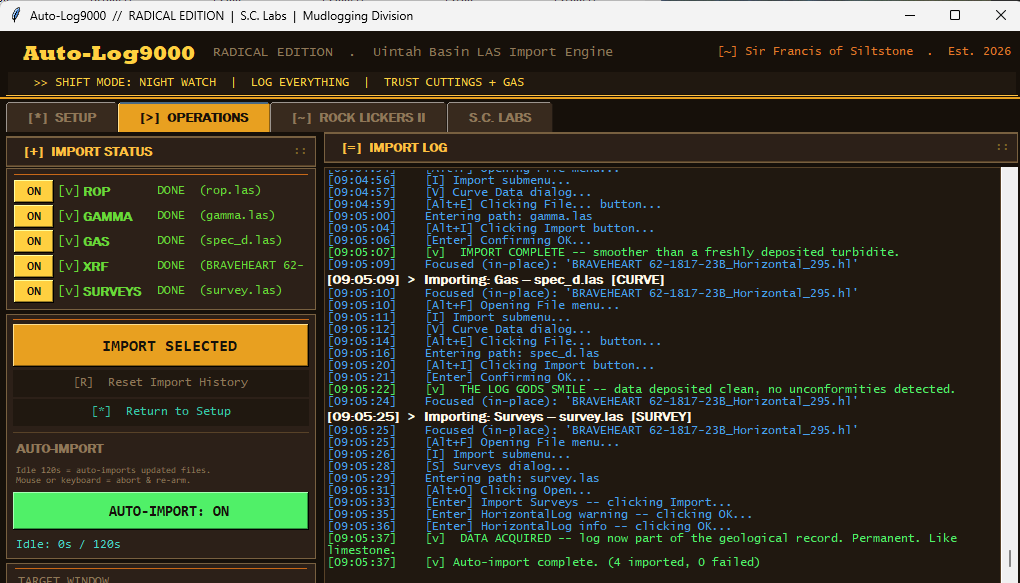
A desktop automation engine for the mudlogging shack — watches the wireline directory, imports ROP / gamma / gas / XRF / survey curves into the geological log every two minutes, so the logger can focus on the cuttings, not the keyboard.
Out in the Uintah Basin, the mudlogger on the night watch has the same routine every two minutes: switch to the wireline laptop, find the latest LAS files, click through five separate import dialogs (ROP, gamma, gas, XRF, surveys), then switch back to the geological log to keep describing cuttings. Miss a cycle and the data goes stale. Miss a few and the morning report is wrong.
The existing software didn't have an "auto-import" button. The vendor's roadmap was 18 months out. The crew needed something now.
Auto-Log9000 is a single-binary Python desktop app that sits on top of the existing log software, watches the wireline output directory, and drives the host application's import workflow via Win32 UI automation. It logs every action, handles partial failures gracefully, and only reaches for the keyboard when something genuinely needs human attention.
The win isn't the automation itself — it's that the mudlogger gets their attention back. Instead of context-switching every two minutes, they describe the rock, watch the gas trace, and trust that the rest of the data is being deposited cleanly into the log behind them. As one operator put it on the project debrief: "smoother than a freshly deposited turbidite."
The system has been running on rigs in the Uintah Basin since deployment, processing thousands of import cycles without a single missed window.
Two extensions are in design: a remote-monitoring web dashboard (so the geological supervisor in town can see import status on every rig in the fleet) and a cloud-sync mode that ships LAS files to a central object store as they're imported, so the office team has near-real-time access to overnight progress.