// automation · integrations · systems

If a person does it twice,
it should do itself.

We specialize in automating systems — the copy-paste, the re-typing, the nightly export someone babysits. Including the legacy software everyone says can't be automated because it has no API.

Deployed in production // No API? No problem // You own the code // Remote or on-site
2min
// import cycle, unattended
24/7
// runs without a person
0
// vendor lock-in
100%
// source code yours
// what we automate

The work nobody should be doing by hand.

Most automation projects don't start with software — they start with someone describing a task they hate. That's the right place to begin.

Legacy software automation

Industrial and back-office software with no API, no export, and no vendor support. We drive the interface directly — clicking, typing, and reading the screen the way a person would, only reliably and at 3am.

Win32macOS UIpywinauto
Data pipelines & ETL

Move data between systems that were never designed to talk — file drops, databases, spreadsheets, APIs, and instruments. Validated on the way through, so bad rows get caught, not silently imported.

PythonPostgresValidation

Reports & documents

Scheduled reports, invoices, compliance paperwork, and client deliverables generated from live data — formatted the way you already send them, not the way a tool wants to.

PDFExcelScheduled

AI-assisted workflows

Language models put where they genuinely help — classifying incoming work, extracting fields from messy documents, drafting first passes, answering questions over your own technical docs. Never as decoration.

Claude APIRAGOn-device

Monitoring & alerting

Something watches the thing that matters — a folder, a feed, a gauge, a queue — and tells the right person the moment it goes wrong. Quiet when it's fine, loud when it isn't.

AlertingSentryTelemetry

Internal tools

The small custom app that replaces a shared spreadsheet and three side conversations — scheduling, dispatch, inventory, job tracking. Built for how your operation actually runs.

Web appDashboardsMulti-user
// what changes

Same job. Nobody doing it.

A real shape of engagement, drawn from work already deployed in the field.

Before

  1. Someone remembers to check the folder
  2. Opens each file by hand
  3. Re-types the values into the other system
  4. Catches a typo two days later
  5. Repeats it every shift, forever
// hours per week · error-prone · stops when they're off

After

  1. A watcher sees the new file the moment it lands
  2. Parses and validates it automatically
  3. Writes it into the target system
  4. Flags anything that doesn't look right
  5. Runs on a schedule, unattended
// minutes of setup · consistent · runs at 3am
// deployed, not theoretical

Automation running in someone's operation.

Not a demo — software that's been doing a real job on a real site.

// the honest comparison

"Can't I just use Zapier?"

Often, yes — and we'll say so. The dividing line isn't simple versus complex. It's whether a failure is cheap to notice and cheap to undo.

  Zapier / Make Power Automate Built for you
Software with no APICan't — architecturalDesktop RPA, per-bot feeYes
Retries & error handlingBasic; loops can stop silentlyBasicBuilt in, alerts a person
Won't double-charge on a retryNot guaranteedNot guaranteedHandled explicitly
Audit trail you can hand an auditorStep logs onlyPartialTimestamped, exportable
Runs on your machine, air-gappedCloud onlyPossibleYes — data never leaves
Cost at ~24,000 events/monthHundreds/mo, metered per step$150–215/bot/moFlat — your hardware
Who fixes it at 3amYou doYou doUs, if you're on a plan
One app to another, low volume, cheap to redoUse Zapier. Seriously.OverkillWe'd be overcharging you

// that last row is real — if a $20/month tool does your job, we'll tell you and help you set it up
// we'd rather have the neighbor than the invoice

// when to walk away

Who this isn't for.

You need one small thing and have an afternoon

Send a thank-you email after a Stripe payment? Do it yourself. The tool walks you through it. There's no reason to pay anyone.

The process itself is broken

Automating a broken process gives you a faster broken process. If the underlying workflow doesn't make sense, fixing that comes first — and it might not need software at all.

Your team hasn't bought in

We've seen automations that added twenty minutes per customer because nobody asked the front desk why they'd been doing it the old way for twelve years. The fix there is buy-in, not code.

You're cash-poor and time-rich

Early on, your own time is the cheapest thing you have. Spend it. Come back when the task is costing you more than the fix.

// what it costs

Priced against the hours it gives you back.

Automation is one of the few things you can actually do the arithmetic on. We measure the task first, then quote a number that's a fraction of what the task costs you every year.

// start here

The automation audit

Half a day watching how the work actually gets done — not how the manual says it does. You get a written findings document ranking what's worth automating, what it would take, and what it would save. Yours to keep either way.

  • We time the real task, start to finish
  • Ranked list of what's worth automating first
  • Honest hours-saved and payback numbers
  • A scoped, fixed quote for the work
  • Refunded if the real problem isn't automation
$500

// local & small business

Book an audit →

Credited in full toward the build.

// one thing

Single Task

from$1,500

One to two weeks

  • One script, one trigger, one output
  • Report generation or file watching
  • Data reformatting and validation
  • Runs on a schedule, unattended

The single task somebody dreads. Good first project.

// full system

System

from$10,000

Four to ten weeks

  • Connected workflows across the operation
  • Dashboard and monitoring
  • Documentation and staff training
  • Custom internal tool if you need one

Replaces the shared spreadsheet and three side conversations.

// specialty

Legacy / No API

Quoted

Scoped after the audit

  • Industrial & back-office software with no API
  • Win32 / macOS interface automation
  • Oil & gas and field systems
  • The stuff other shops turn down

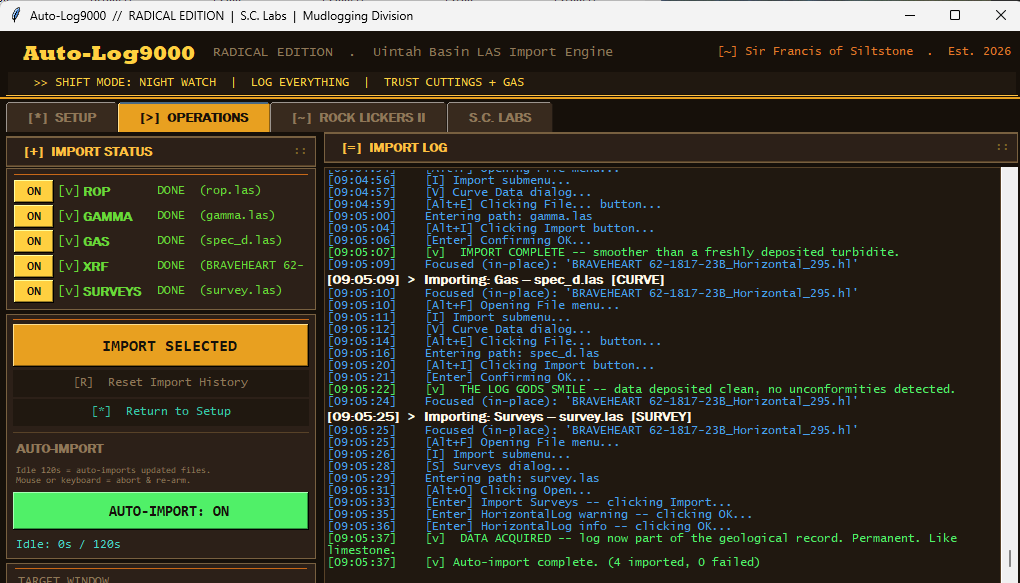
Very few people do this work. Auto-Log9000 has been running in a mudlogging shack for a while now.

Ongoing supportWhat it coversCost
WatchMonitoring and alerting, break-fix within a few daysfrom $200/mo
MaintainNext-business-day response, small changes as you gofrom $600/mo
OperateSame-day response, interface-drift repair, monthly reportfrom $1,800/mo
Hourly, out of contractChanges, additions, one-off fixes$125–225/hr

// support is optional — you own the source and can maintain it yourself or hand it to anyone
// automations against software with no API do break when the vendor changes their interface. that's what Operate is for.

// how we get to a number

The arithmetic, out loud.

No mystery, and no "digital transformation" language. Here's a real shape of a small job.

Someone spends8 hours a week on the task 
Their real cost to youwage + tax + benefits ≈ $30/hr 
So the task costs, per year8 × 52 × $30$12,480
We'd quote roughly a thirdone-time, fixed~$3,700
It pays for itself in under 4 months

// we'll show you this table with your numbers in it before you commit to anything
// and if the honest payback is three years, we'll tell you that and talk you out of it

// how it goes

From "I hate this task" to it's handled.

01

Watch the work

You show us the task exactly as you do it today. Half of automation is noticing which steps only exist out of habit.

02

Map & scope

We write down the real process, the edge cases, and what happens when something's malformed — then quote the piece worth automating first.

03

Build & pilot

It runs alongside the manual process on real data until you trust it. No flipping a switch and hoping.

04

Hand over

Documented source you own, plus alerting so it tells you when it needs attention. Optional retainer if you'd rather we keep watching it.

// the questions people actually ask

Fair questions, straight answers.

What if you get hit by a bus?

Reasonable question for a one-person shop, and the answer is procedural rather than reassuring noises.

You own the source code and every credential from day one — not on request, by default. Everything ships with written documentation good enough for another developer to pick up cold, because that's the actual test. On System-tier work we'll put the code in escrow with a third party who releases it to you on agreed triggers. And nothing we build requires us to run it; if we vanish, it keeps running on your hardware.

You shouldn't want a promise that we'll never disappear. You should want proof that if we did, you wouldn't be stranded.

Why would I keep paying you after it's built?

You don't have to — support is optional and you can maintain it yourself or hand it to anyone.

But here's the honest failure mode. A vendor changes an API token. The workflow stops silently. Nobody notices for six weeks. We've seen a business discover $30,000 in unbilled hours by the time they called someone.

Three boring things break automations: software updates, credential and API changes, and staff turnover changing the process underneath. None of them announce themselves. That's what a plan buys — something watching, and someone who already knows how it works.

Won't UI automation break when the vendor updates their software?

Yes. Eventually it will. Anyone who tells you otherwise is selling something.

Software with no API has no contract with us — the vendor can move a button and we find out when it breaks. We build defensively: the automation checks that it's looking at what it thinks it's looking at, and it stops and tells someone rather than doing the wrong thing quietly.

That's precisely what the Operate plan is for. Interface drift is the expected cost of automating software that was never meant to be automated, and it's cheaper than the alternative of doing it by hand forever.

Can't I just have an AI build this?

Sometimes, genuinely. For a well-defined task against a modern API, a capable person with an AI assistant and a free afternoon can get there.

What you're actually buying is different: somebody builds it, tests it against the ugly cases, watches it for the first month to be sure, and is accountable when it breaks at 3am. An AI will write you code. It won't notice six weeks later that it stopped working.

Worth knowing: Gartner expects over 40% of agentic AI projects to be cancelled by the end of 2027, and the FTC sued an AI automation company in 2025 over roughly $19 million in customer losses. The technology is real. A lot of what's sold around it isn't.

We're small, and our setup is weird. Are we too small?

Weird is normal — most real operations are held together with something nobody would design on purpose.

Too small is a real possibility though, and the audit exists to find out. If the honest answer is that the task doesn't cost you enough to justify fixing, we'll say so and refund the audit. We'd rather return $500 than take $4,000 for something that doesn't pay you back.

Where does our data go?

Nowhere. That's a genuine difference worth understanding.

Cloud automation platforms move your data through their servers — that's how they work. Zapier is cloud-only and can't sign a HIPAA business associate agreement at all.

What we build runs on your machine, on your network. Your files, credentials, and customer records stay where they are. For anyone handling medical, financial, legal, or commercially sensitive industrial data, that's usually the whole conversation.

How many jobs do you take at once?

Two builds at a time. That's not scarcity marketing — it's the honest capacity of one person who does the work rather than selling it and handing it off.

It means you're talking to the person writing the code, and it means we sometimes can't start immediately. Ask and we'll tell you the real date.

Service-disabled veteran-owned · Colorado run

Available for federal, state, and prime-subcontract work. Capability statement, NAICS codes, and registration details are on the capabilities page.

Capabilities →
// next step

What's the task you'd hand off first?

Describe the thing someone on your team does over and over. We'll tell you honestly whether it's worth automating, and roughly what it takes.